BIOS Archive0.17.13132.93998
Publisher Description
**YOU MUST DOWNLOAD ASTRO FILE MANAGER TO USE THIS**
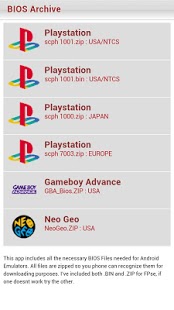
Get all the BIOS files in one app! BIOS Files for Android emulators, such as FPse, PSX4Droid, DroidEMU, DroidEMU Light, Gameboid, GBA.Emu, Tiger GBA,and NeoGeo Emulators.
Start playing, buy BIOS Archive today!
- Files save to /sdcard/Download/ or /sdcard/ext_sd/Download/
- You will need Astro File Manager download & unzip files.
Files are not hosted on our servers, they are gathered from the internet.
**PLEASE VISIT ROMS4DROID.COM FOR SUPPORT**
Please do not rate the APP with negative comments if you HAVE NOT contacted me. I'm more than happy to help.
Playstation Logo or "Playstation" is a trademark of Sony Entertainment.
GBA or "Game Boy Advance" is a trademark of Nintendo Corporation.
Tags: bios for fpse, gameboy bios, bios fpse, bios fpse android, download bios for fpse, download fpse bios, gba bios, atari bios, neo geo bios
About BIOS Archive
The company that develops BIOS Archive is Roms4Droid. The latest version released by its developer is 0.17.13132.93998. This app was rated by 2 users of our site and has an average rating of 4.8.
To install BIOS Archive on your Android device, just click the green Continue To App button above to start the installation process. The app is listed on our website since 2011-08-13 and was downloaded 2,362 times. We have already checked if the download link is safe, however for your own protection we recommend that you scan the downloaded app with your antivirus. Your antivirus may detect the BIOS Archive as malware as malware if the download link to com.dreamstep.wBIOSArchive is broken.
How to install BIOS Archive on your Android device:
- Click on the Continue To App button on our website. This will redirect you to Google Play.
- Once the BIOS Archive is shown in the Google Play listing of your Android device, you can start its download and installation. Tap on the Install button located below the search bar and to the right of the app icon.
- A pop-up window with the permissions required by BIOS Archive will be shown. Click on Accept to continue the process.
- BIOS Archive will be downloaded onto your device, displaying a progress. Once the download completes, the installation will start and you'll get a notification after the installation is finished.
Program Details
System requirements
Download information
Pricing
Version History
version 0.17.13132.93998
posted on 2011-08-13
version 0.17.13132.93998
posted on 2011-08-13
Several fixes and updates
